



BestOnlyFans approaches this as a timing problem: when you enter, when you evaluate, and when you exit matter more than the headline discount. Budgeting around creator promotional cycles means treating a discount as a temporary state with a defined end date, not a permanent price. Subscribers who map those cycles spend less for the same access, while those who ignore them often pay full price for months without noticing.
The difficulty sits in the mechanics: conversion dates, auto-renewal status, and the gap between a discounted first period and the standard base rate afterward.

The Anatomy of a Creator Promotional Window
Every promotional offer is built from four moving parts, and each one changes how much you actually pay over time. Auto-renewal status decides whether the charge happens on its own, while the cancellation deadline sets how much warning you have before the full rate applies. A paid base subscription must sit between $4.99 and $49.99, yet promotional first months can fall below that floor.

That protection only helps if you notice the change and decide deliberately instead of letting the subscription roll into a new full-price term. Most paid subscriptions cluster between $4.99 and $15, with averages landing around $5 to $10.
- Discounted first period: the exact amount charged at sign-up, which may fall below the $4.99 base minimum.
- Base price after conversion: the standard rate that applies once the promotional period ends.
- Auto-renewal status at sign-up: whether the subscription renews automatically or requires manual action.
- Cancellation deadline: the last date you can cancel and still avoid a full-price charge.
Tip: before subscribing to any promotional offer, write the conversion date in your calendar during the same session. Subscribers who track conversion dates cancel at roughly the right moment; those who rely on memory usually pay one or two extra full-price months.
Seasonal and Event-Driven Promotion Patterns
Creator promotions are not random. Understanding when discounts appear lets you delay a purchase by a few weeks and enter at a lower rate instead of paying full price out of impatience.
Platform growth reinforces the pattern. Guides that cite platform statistics note that user surges create more competition for attention, and competition pushes creators toward promotional pricing. The 2020 surge is the clearest example: a large influx of new accounts pushed established creators to discount more aggressively to defend their subscriber base.

- New Year and January: resolution-driven signup waves push creators to discount first months; good timing for trial entries you plan to exit.
- Valentine’s Day: short, sharp promotional windows with limited duration; verify the conversion date because these offers compress quickly.
- Summer lull: subscriber attention drops, so discounts deepen; strong period for entering subscriptions you intend to keep longer.
- Black Friday and December: the heaviest promotional cluster of the year, often combining first-month discounts with bundled PPV offers.
- Creator milestones: subscriber goals, anniversaries, and return-from-break announcements trigger one-off discounts that follow no calendar at all.
Without a directory, subscribers cannot easily compare promotional states across creators, which is why ranking and tracking sites exist as a workaround.
The Promotional Trap: Cheap Entry, Expensive Stay
A $3 first month feels disposable, so the decision to subscribe gets less scrutiny than a $15 commitment.
Three biases do most of the damage. Anchoring makes the discounted price feel like the reference point, so the converted base price feels like an increase rather than the actual price. Loss aversion then keeps subscribers attached once they have accumulated content they value, and status quo bias handles the rest when auto-renewal continues without a prompt.
| Behavioral Bias | Promotional Trigger | Annual Cost Impact |
|---|---|---|
| Anchoring effect | Deep first-month discount on a mid-range base price | Base price feels inflated, so subscribers delay cancellation and absorb extra full-price months |
| Loss aversion | Promotional period ending after a content backlog builds up | Cancellation is deferred to preserve access, extending full-price billing beyond intent |
| Status quo bias | Auto-renewal continuing after conversion | Subscriptions persist on inertia, adding months of unintended full-price spend |
| Sunk-cost thinking | Promotional entry followed by PPV and tip spending | Prior spending justifies continued subscription even at a rate the subscriber would not re-choose |
Pay-per-view and chat spending amplify the effect. PPV messages unlock up to $50, paid chat commonly runs $3 to $5 per message, and tips can reach $100. A subscriber who entered on a $5 promotion may spend more on unlocks in month one than on the subscription itself, which makes the subscription feel load-bearing and harder to cancel.

The platform keeps 20% of everything and the creator receives 80%, so every dollar spent above the subscription is a direct creator payment rather than a platform fee. That matters for budgeting because PPV and chat costs scale with engagement, not with the subscription price you accepted at entry.
Building a Promotional-Aware Subscription Calendar
The goal is simple: know every conversion date before it arrives, and decide in advance whether the base price is worth paying. Six fields cover almost every case.
Keep the sheet wherever you already plan recurring expenses, and update it the moment you subscribe rather than the moment you remember.
- Creator name: the subscription this row tracks.
- Entry price: what you actually paid in the promotional period.
- Conversion date: the date the base price takes effect.
- Base price: the standard rate after conversion.
- Planned evaluation date: a date three to five days before conversion, when you decide to stay or leave.
- Decision status: keep, cancel, or rotate, recorded at the evaluation date.
Placing it a few days before conversion gives you time to cancel deliberately rather than reacting to a charge.
A second column for PPV and tip spending per month reveals the real cost of each subscription, which is the number worth comparing against alternatives. Tracking a subscription that converted last week is still useful; one that converted three months ago has already cost you the difference between the promotional rate and the base rate.
Comparing True Annual Costs: Promotional Versus Stable
Three scenarios cover most subscriber behavior, and the differences are large enough to change how you plan.
- Single promotional entry with planned exit: subscribe on a discount, cancel before conversion, then resubscribe later on another discount.
- Repeated promotional rotation between two creators: alternate discounted entries across two subscriptions instead of holding either at full price.
- Stable-price continuous subscription: one creator, full base price, no interruptions, maintained for twelve months.
| Strategy Type | Assumed Monthly Base | Modeled Annual Spend |
|---|---|---|
| Pure promotional rotation, exits executed on time | $5 promotional entry, $10 base | Roughly $60 to $80 across two creators |
| Selective promotional entry with one stable core | $10 stable plus $5 rotating | Roughly $150 to $170 total |
| Fully stable subscription portfolio | $10 per subscription, two subscriptions | Roughly $240 with no promotional timing |
A subscriber who rotates between two creators at $5 promotional entries but misses two conversion dates ends up paying $10 to $15 for several months, which erases the savings entirely.
Stable pricing wins when the creator’s output genuinely justifies the full rate and you would resubscribe immediately after any cancellation. Mixed portfolios usually produce the best outcome: hold one or two subscriptions at stable pricing for creators you value consistently, then use promotional entries for everything else.
BestOnlyFans Promotional Tracking Features
BestOnlyFans addresses this by treating promotional status as a first-class data point rather than a footnote, which makes conversion dates visible at the point of decision instead of buried in a billing page. A subscriber deciding whether to keep a subscription at $12 needs to see the entry price, the elapsed promotional months, and the current base price in one place.
The ranking methodology also helps with timing across creators rather than within a single subscription. Subscribers who want a broader overview of available pages and pricing structures often use ranking resources like the best onlyfans site to compare options before committing, which reduces the chance of entering a promotional offer on a creator who does not fit long-term.
None of this replaces personal judgment. Tracking tools show dates and prices, but they cannot decide whether a creator’s output is worth the base rate for you. The value is in removing the memory burden so the judgment happens on schedule rather than after the charge.
Exit Timing Before Promotional Conversion
A $0.10 hold is placed on the payment method and refunded within days, which is not a subscription cost and should not be confused with the promotional price.

- Cancel at least three days before the conversion date: billing cycles and processing windows do not align perfectly with calendar dates.
- Verify auto-renewal status after any price change: a creator price increase stops auto-renew, and access ends when the paid period finishes.
- Confirm cancellation in the subscription list, not just the dialog: some subscribers close the cancellation screen without completing the final step.
- Screenshot the confirmation: it settles any dispute about whether the cancellation was processed before the renewal date.
Access continues until the end of the paid period even after cancellation, so there is no reason to delay the decision to the final day.
Warning: never assume a discount will convert quietly. Auto-renewal behavior changes when creators adjust prices, and the only reliable way to know your status is to check the subscription list directly before each conversion date.
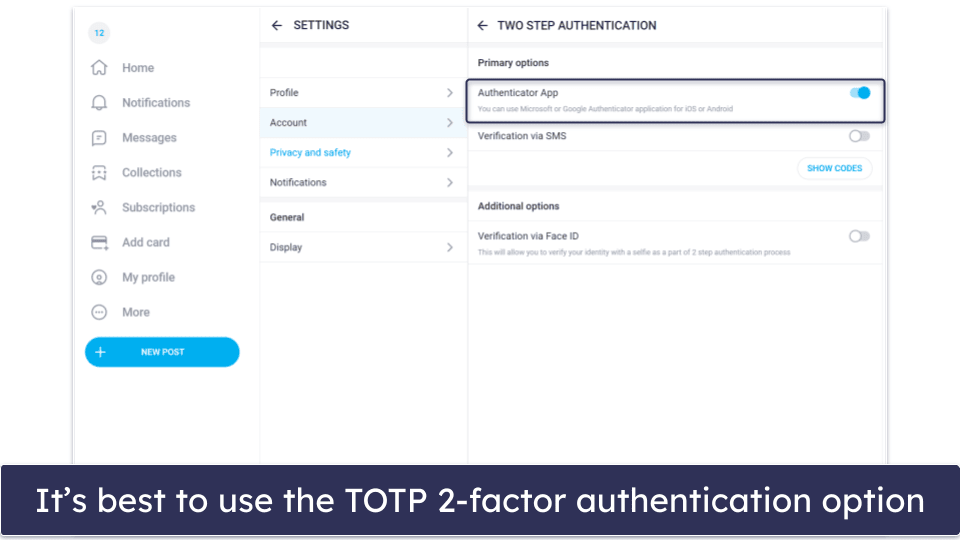
Account security supports all of this. Two-step authentication on the account prevents unauthorized logins that could change subscription settings, and reviewing active subscriptions monthly keeps the promotional calendar accurate.

FAQ
When does a promotional price convert to the regular subscription rate?
If the creator raises the base price at any point, auto-renew stops and your access continues only until the current paid period finishes.
Can I cancel during the promotional period without losing access?
Yes. Cancelling during the promotional period stops future renewals but does not remove access you already paid for. You keep the subscription until the end of the period you purchased, which means cancelling early is safer than waiting for the deadline.
How do I track which of my subscriptions are still promotional?
The subscription list shows the price that will be charged next, which is the fastest way to spot a subscription that has already converted.
Is it cheaper to hop between promotions or stay with one creator?
Rotation is cheaper when discounts are deep and exits happen on time, typically producing the lowest annual spend. Staying with one creator is cheaper when you would resubscribe immediately after cancelling, because stable pricing avoids the risk of missed conversion dates and unintended full-price months.